Grapple Sniper Arena Guides & Walkthroughs
From first join to map mastery, mobile tips, and trickshots—every core tutorial in one place.
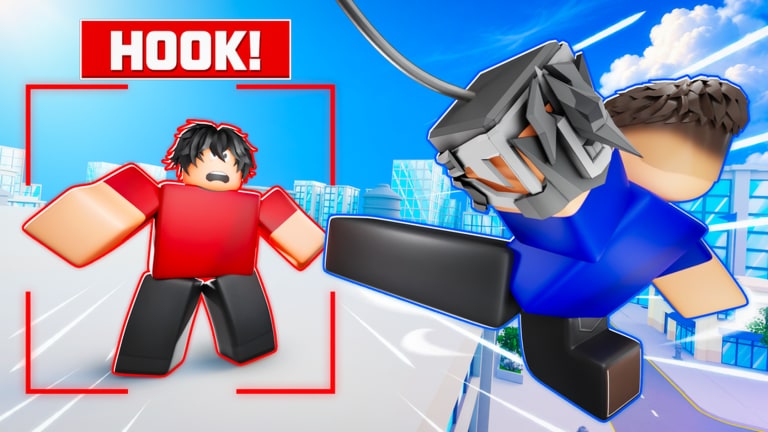
Welcome to the Guides Hub for Grapple Sniper Arena. This Roblox shooter by Slunce zapadá rewards movement IQ: grappling across arenas, hooking enemies, landing dropkicks, and confirming with the sniper in Free For All or Capture the Flag. Use this page as the map of every tutorial we publish so you never guess which article to open next.
Start here if you just installed the game, then branch into movement, map IQ, modes, devices, and style guides as your Coins and confidence grow.
Start here
- Getting Started — Day-one loop, what to unlock first, and how a 13-player server feels.
- Controls — PC, mobile, tablet, Xbox, and PlayStation inputs for grapple, fire, and menus (including the M / Gear path used for codes).
New players should finish Getting Started before chasing highlight clips. Favoriting the experience and joining Grapple Sniper Arena community spaces also helps you hear about patches on the Updates Hub.
Movement & combat tech
Movement is the skill ceiling.
- Grapple Movement — Traversal hooks, enemy hooks, swing lines, and unpredictable exits.
- Dropkick Guide — Timing the kick after a hook or flank, knockback uses, and when not to dive.
- Aim Tips — Pre-aiming grapple exits, tracking airborne targets, and device-specific sensitivity habits.
Practice these in Free For All warm-up lobbies before ranked ego. Pair them with the playstyles tier list so your tech serves a coherent identity.
Map, devices & style
- Map Guide — High ground, grapple routes, spawn awareness, and cover for FFA and CTF.
- Mobile Guide — Touch aiming, UI habits, tablet tips, and when switching to PC makes sense.
- Trickshots — Mid-air snipes and flashy grapples practiced safely without feeding.
Run the settings checklist before map or trickshot sessions so sensitivity resets do not fake a “broken” patch.
Mode guides
- FFA Guide — Spawn logic, multi-kill routes, and how to reset when the lobby snowballs.
- CTF Guide — Flag paths, escort grapples, denial hooks, and role splits for 13-player servers.
Mode pages assume basic controls. If Capture the Flag feels chaotic, re-read movement and map guides, then return—flag tempo collapses without clean hooks.
Progression & cosmetics
- Skins & Coins — How Coins drop from play, what Sniper / Knife / Grapple skins cost conceptually, and smart buy order.
- Cross-link: Skins tier list for priority rankings once you have a Coin surplus.
- Redeem help: Codes Hub and How to Redeem (still no active codes as of late November 2026).
Remember: skins do not change damage. Spend for clarity and style after you can survive a full match without feeding.
Suggested learning path
- Getting Started + Controls
- Ten FFA matches focusing only on traversal grapples (Grapple Movement)
- Add landmark routes from the Map Guide
- Add enemy hooks and Dropkick confirms
- Tighten shots with Aim Tips while reading the FFA Guide
- Touch players: complete the Mobile Guide pass
- Queue CTF with the CTF Guide and a flag-runner mindset from the Tier List Hub
- Optional flair: Trickshots in lab FFA only
- Spend Coins via Skins & Coins / Skins tier
- Recheck Updates after patches so tech still matches live physics
How guides relate to other hubs
- Codes — Freebies are rare right now; status on the Codes Hub, steps on How to Redeem.
- Tools — Prep checklists on the Tools Hub.
- Tier List — Converts guide skills into ranked archetypes.
- Players — Find groups on the Players Hub.
- Scripts — Tempted by cheats? Read Scripts and safety instead of risking a ban.
- Links — Official Roblox join link on the Links Hub.
Writing standards for this wiki
Every guide aims for practical steps, internal links with clear anchor text, and FAQs that match real search questions. We avoid filler endings and duplicate boilerplate. When a November patch changes hook feel or mode rules, the November 2026 update notes should be your first stop before blaming your aim.
Quick troubleshooting
| Problem | Open this guide |
|---|---|
| Do not know menus or devices | Controls |
| Keep missing hooks | Grapple Movement |
| Die to spawns / roofs | Map Guide |
| Touch aim feels hopeless | Mobile Guide |
| Die every close fight | Dropkick Guide + Aim Tips |
| Want clips without feeding | Trickshots |
| FFA feels random | FFA Guide |
| CTF teammates ignore the flag | CTF Guide |
| Broke and skinless | Skins & Coins |
Jump into any article above, play a focused block of matches, then return here to pick the next skill. Grapple Sniper Arena clicks when movement, map IQ, aim, and mode sense level up together—not when you only grind one mechanic in isolation.
Frequently Asked Questions
Quick answers to the most common Grapple Sniper Arena questions.
Which Grapple Sniper Arena guide should I read first?
Start with Getting Started, then Controls. Move into Grapple Movement and the Map Guide before specializing in FFA or CTF.
Are these guides for PC only?
No. The game supports PC, Mobile, Tablet, Xbox, and PlayStation. Controls, Aim Tips, and the Mobile Guide call out device differences where they matter.
Do I need codes or scripts to follow these guides?
No. Guides assume fair play with Coins earned in-match. Codes are optional when active; scripts risk bans and are not required.
How do guides connect to the tier list?
Guides teach mechanics; the Tier List Hub ranks playstyles that use those mechanics in FFA and Capture the Flag.
Where are map, mobile, and trickshot guides?
Map Guide, Mobile Guide, and Trickshots are linked in the Map, devices & style section above and in the learning path.